Android - Broadcast Receivers
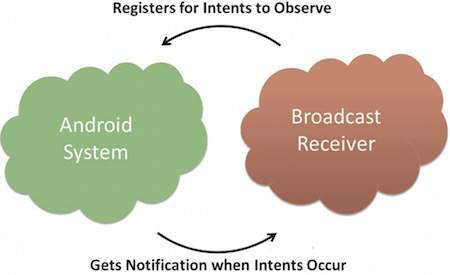
Broadcast Receivers simply respond to broadcast messages from other applications or from the system itself. These messages are sometime called events or intents. For example, applications can also initiate broadcasts to let other applications know that some data has been downloaded to the device and is available for them to use, so this is broadcast receiver who will intercept this communication and will initiate appropriate action.
There are following two important steps to make BroadcastReceiver works for the system broadcasted intents −
- Creating the Broadcast Receiver.
- Registering Broadcast Receiver
There is one additional steps in case you are going to implement your custom intents then you will have to create and broadcast those intents.
Creating the Broadcast Receiver
A broadcast receiver is implemented as a subclass of BroadcastReceiver class and overriding the onReceive() method where each message is received as a Intent object parameter.
public class MyReceiver extends BroadcastReceiver {
   @Override
   public void onReceive(Context context, Intent intent) {
      Toast.makeText(context, "Intent Detected.", Toast.LENGTH_LONG).show();
   }
}
Registering Broadcast Receiver
An application listens for specific broadcast intents by registering a broadcast receiver in AndroidManifest.xml file. Consider we are going to register MyReceiver for system generated event ACTION_BOOT_COMPLETED which is fired by the system once the Android system has completed the boot process.
BROADCAST-RECEIVER
<application
   android:icon="@drawable/ic_launcher"
   android:label="@string/app_name"
   android:theme="@style/AppTheme" >
   <receiver android:name="MyReceiver">

      <intent-filter>
         <action android:name="android.intent.action.BOOT_COMPLETED">
         </action>
      </intent-filter>

   </receiver>
</application>
Now whenever your Android device gets booted, it will be intercepted by BroadcastReceiver MyReceiver and implemented logic inside onReceive() will be executed.
There are several system generated events defined as final static fields in the Intent class. The following table lists a few important system events.
| Sr.No | Event Constant & Description |
|---|---|
| 1 |
android.intent.action.BATTERY_CHANGED
Sticky broadcast containing the charging state, level, and other information about the battery.
|
| 2 |
android.intent.action.BATTERY_LOW
Indicates low battery condition on the device.
|
| 3 |
android.intent.action.BATTERY_OKAY
Indicates the battery is now okay after being low.
|
| 4 |
android.intent.action.BOOT_COMPLETED
This is broadcast once, after the system has finished booting.
|
| 5 |
android.intent.action.BUG_REPORT
Show activity for reporting a bug.
|
| 6 |
android.intent.action.CALL
Perform a call to someone specified by the data.
|
| 7 |
android.intent.action.CALL_BUTTON
The user pressed the "call" button to go to the dialer or other appropriate UI for placing a call.
|
| 8 |
android.intent.action.DATE_CHANGED
The date has changed.
|
| 9 |
android.intent.action.REBOOT
Have the device reboot.
|
Broadcasting Custom Intents
If you want your application itself should generate and send custom intents then you will have to create and send those intents by using the sendBroadcast() method inside your activity class. If you use the sendStickyBroadcast(Intent) method, the Intent is sticky, meaning the Intent you are sending stays around after the broadcast is complete.
public void broadcastIntent(View view) {
   Intent intent = new Intent();
   intent.setAction("com.tutorialspoint.CUSTOM_INTENT");
   sendBroadcast(intent);
}
This intent com.tutorialspoint.CUSTOM_INTENT can also be registered in similar way as we have regsitered system generated intent.
<application
   android:icon="@drawable/ic_launcher"
   android:label="@string/app_name"
   android:theme="@style/AppTheme" >
   <receiver android:name="MyReceiver">

      <intent-filter>
         <action android:name="com.tutorialspoint.CUSTOM_INTENT">
         </action>
      </intent-filter>

   </receiver>
</application>


No comments:
Post a Comment
Note: only a member of this blog may post a comment.